
Recording the first payment
A payment is recorded against a fee agreement: what a student has agreed to pay, and when. So the first payment is two steps: the agreement, then the money. Owners, admins, and anyone allowed to manage Student Fees can do both. A student enrolled in a priced group already has their agreement - skip to recording the payment.
Agree the fee
Section titled “Agree the fee”The student must be enrolled in a running group, as they are once the group is open.
-
In Finance, open Fees and press New Student Pay.
-
In Student Name, type part of the student’s name and choose them from the list.
-
In Group, choose their group.
-
Choose Monthly or One Time, and check Price of the whole course: it starts at the group’s or the course’s price.
-
For a monthly fee, enter how many Months.
-
If the student paid something now, enter it in Paid today: it is recorded as a payment when you save, and you can skip the next section.
-
Press Save fee.
Record the payment
Section titled “Record the payment”
- Add Payment
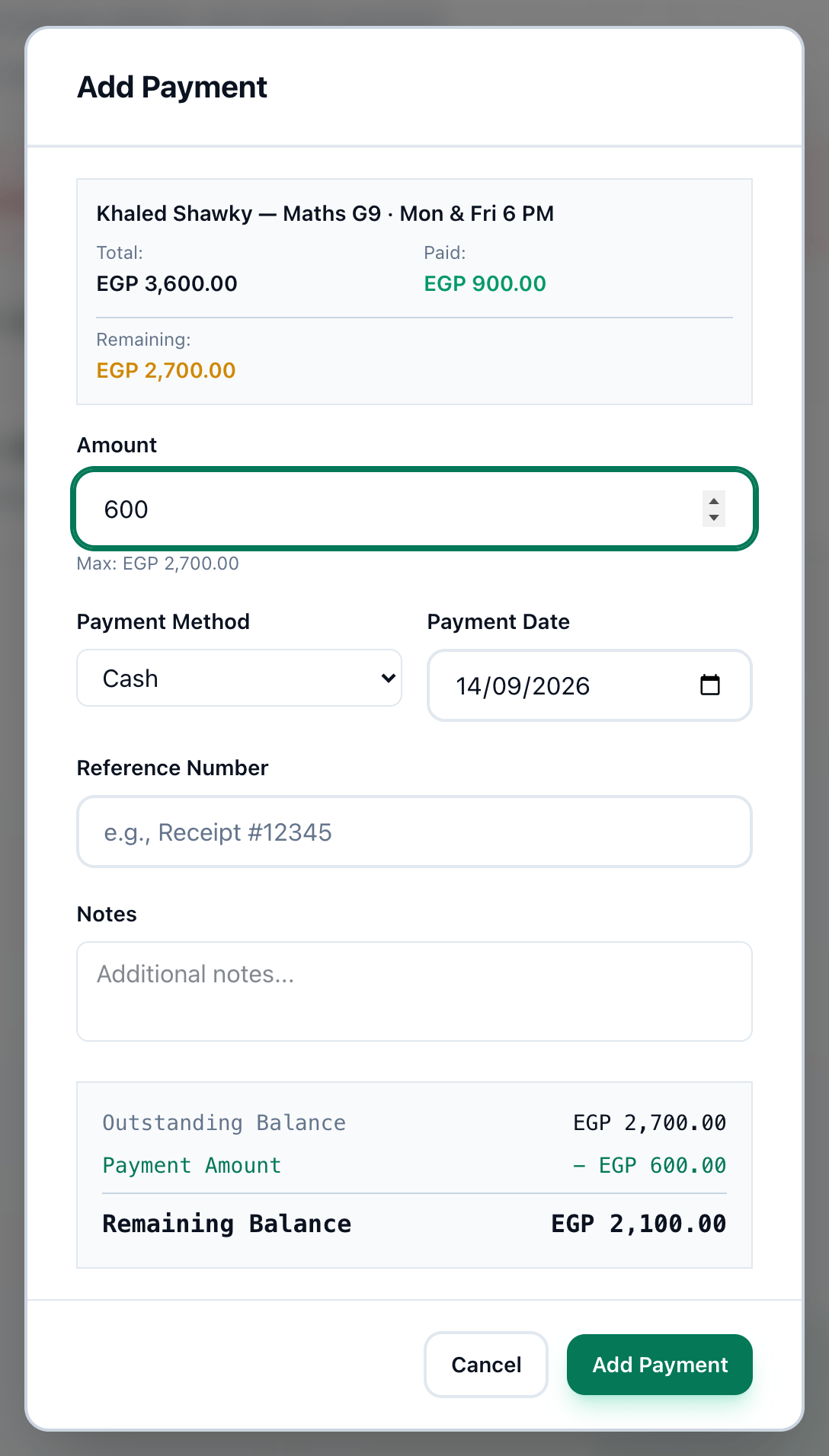
- Amount
- Payment Method
- Payment Date
- Reference Number
- Add Payment
-
On Fees, type the student’s name in Search by student, fee or group, and press + on their agreement.
-
Enter the amount paid in Amount. It cannot be more than the balance.
-
Choose how they paid in Payment Method.
-
Check Payment Date. It is today unless you change it.
-
If there is a receipt or transfer number, enter it in Reference Number.
-
Press Add Payment. Payment recorded confirms it, with the new balance.
Hand over the receipt
Section titled “Hand over the receipt”Payment recorded stays open. Press Print receipt to print it, or Send receipt to email it to the student’s email address, then press Done.
What happens next
Section titled “What happens next”- Monthly instalments, discounts, and the deposit: Setting up a student’s fees. Receipts again and corrections: Payment records, receipts and corrections.
- For a student who joins later, Enrol student on Teaching → Students adds them and enrols them in one form, and their fee follows: see Adding a student.
- That is your first week. Every tab has its own chapter, starting with Home.